
Publish to App Store
Submit your iOS app to the Apple App Store for review.
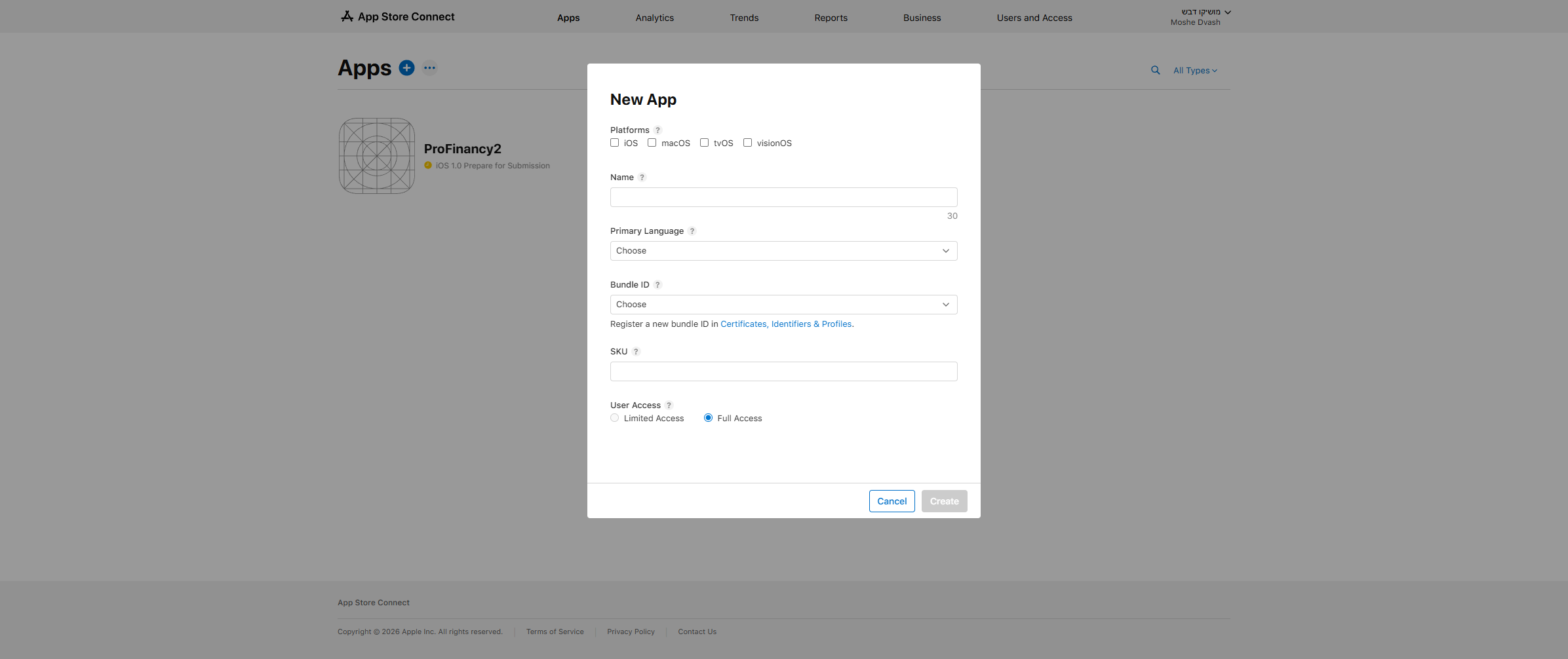
To publish to the App Store, you must create the app in App Store Connect before building in AppMyWeb. Apple requires the app to exist in their system before you can upload builds. The Bundle ID and App Name must match exactly.
Requirements
💳 Developer Account
$99/year at developer.apple.com
🔑 iOS API Key
Created in AppMyWeb Key Manager
📱 App in App Store Connect
Must create app BEFORE building in AppMyWeb
🖼️ Screenshots
iPhone 6.5" and 5.5" screenshots required
Step 1: Create App in App Store Connect
Create the app record in App Store Connect first. This is required before building with "Publish to App Store" option.
com.company.myapp)
Step 2: Build & Publish
After creating the app in App Store Connect, build in AppMyWeb with "Publish to App Store" option. The build will automatically upload to App Store Connect.
Build in AppMyWeb
Go to Services → App Download → Select iOS → Choose "Publish to App Store" → Click NEW BUILD
Wait for Upload
Build takes 5-15 minutes. App automatically uploads to App Store Connect (no Mac needed!)
Complete App Information
In App Store Connect: Add screenshots, description, privacy policy, pricing
Submit for Review
In App Store Connect: Add for Review → Submit. Review usually takes 24-48 hours.
Troubleshooting
If your build fails, check that App Name and Bundle ID match exactly. See iOS Troubleshooting for detailed solutions.